1. Where to stand
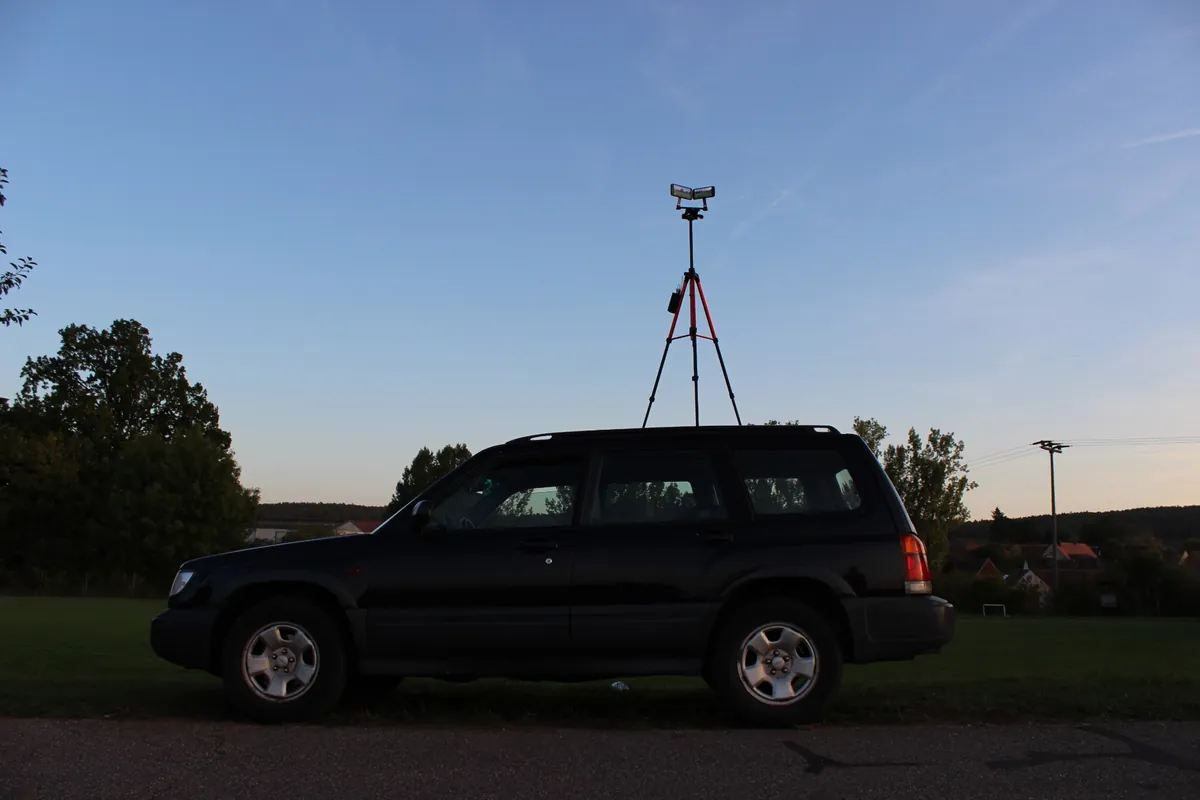
Height beats any lens. The higher the camera, the more of the pitch you see and the less players block each other. A tripod at full height, a spot in the stand or on a raised railing makes a bigger difference than a new phone.
Level with the halfway line. From there both goals are about the same distance away and you film every move side-on, just like on TV. Stand a little back from the touchline so throw-ins and spectators do not walk into the shot.
Keep the camera still. For highlights, a steady wide shot beats panning by hand. Follow the ball for 90 minutes and you will miss a goal, guaranteed. A fixed camera records everything, and you choose the framing later.
2. The gear you need
- An iPhone. Any recent model films a grassroots match well, even an older one in 1080p.
- A tripod with a phone mount. Height is what counts: a travel tripod that extends to around 1.8 m is ideal.
- A power bank and cable. 90 minutes of video drains the battery.
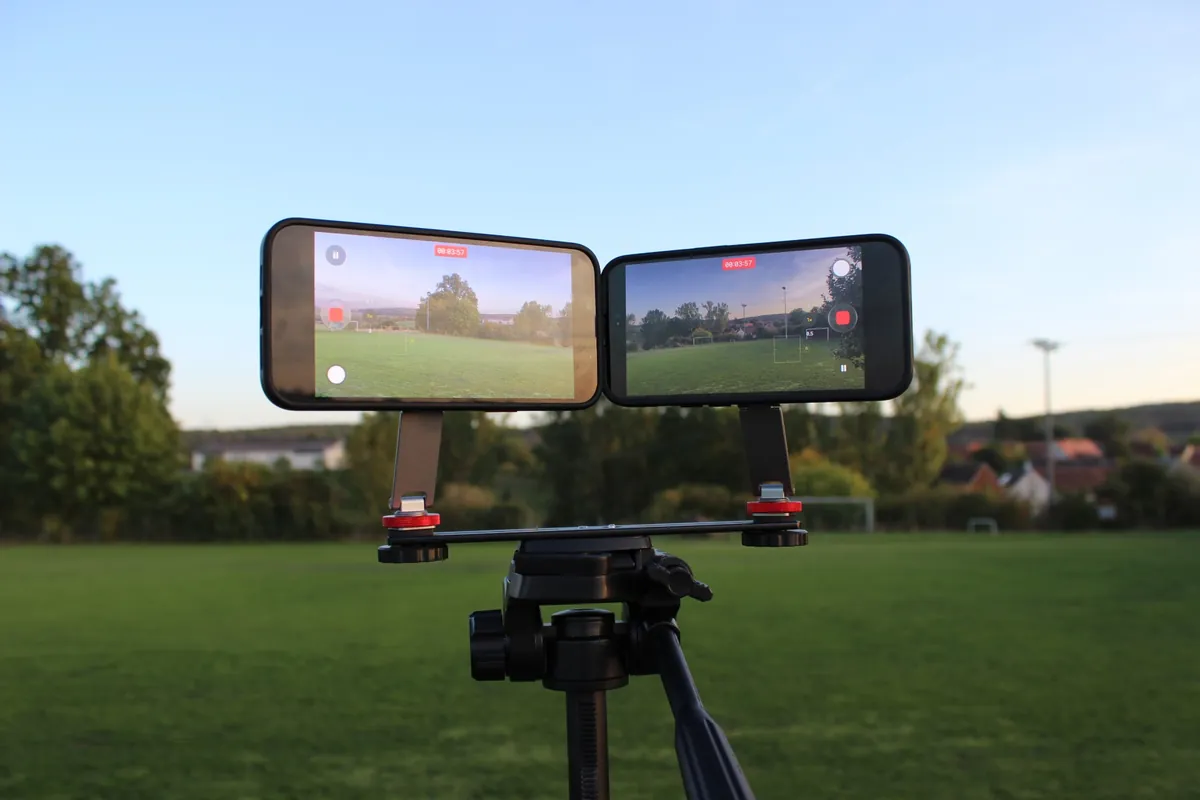
- Optionally a second camera. With a dual mounting bar, two iPhones can film from the same tripod.
Our own setup with photos from the pitch, two iPhones on a dual bar with magnetic mounts, is on the Gear page.
3. iPhone camera settings
- Always film in landscape. A pitch is wide. Portrait clips for social media can be cropped from the landscape recording later.
- Our recommendation: 4K at 30 frames per second. It is sharp enough for highlights and cropping and needs about half the storage of 60 fps. 60 fps looks a little smoother, but in the evening under floodlights it can take close to 100 GB per match. You will find it under Settings › Camera › Record Video.
- Do not zoom. Digital zoom costs sharpness. Use the wide lens (1×), or with a single camera on a small pitch the ultra wide (0.5×) so the whole pitch fits.
- Lock exposure and focus. In the Camera app, press and hold on the pitch until “AE/AF Lock” appears. The brightness then stays put when a player runs past close to the camera.
- Record continuously. Start before kick-off and only stop after the final whistle. Lots of short clips are harder to manage, and the one time you stop, someone scores.
4. Battery and storage for 90 minutes
| Format | Storage per match (approx.) | When to use it |
|---|---|---|
| 4K, 30 fps | roughly half of 60 fps | Our recommendation for most matches |
| 4K, 60 fps | about 40 GB in daylight, up to about 100 GB under floodlights | Only with lots of free space |
| 1080p, 30 fps | around 10 GB | Little free space or older iPhones |
Why so much more in the evening? In low light the image gets noisy. Noise is lots of tiny detail the video codec has to store, so the file grows fast. Under floodlights, 30 fps pays off twice.
Check your free storage before the match and plug the iPhone into a power bank. Leave the cable slack so nobody trips over it and tips the mount. Turn on Airplane Mode or a Focus like Do Not Disturb so a call cannot interrupt the recording.
5. Recording with two cameras
With one camera at the halfway line, the action in the box is fairly far away. With two cameras, each covers one half of the pitch and every goal is filmed up close. A second angle behind the goal looks great too.
The only tricky part is lining both recordings up with the match clock afterwards. MatchReel syncs multiple cameras automatically using their recording time, and in the editor you pick the better angle for each moment.
6. Floodlights, sun, wind and rain
- Sun behind you. Backlight turns players into silhouettes. If you can choose your side, stand so the sun comes from behind or from the side.
- Floodlights. Evening matches work surprisingly well on an iPhone. Keep floodlight masts from shining straight into the lens and lock the exposure on the pitch.
- Wind. A tall tripod wobbles. Hang your bag from the hook under the centre column if your tripod has one, or weigh down the legs.
- Rain. A freezer bag with a hole for the lens or a small umbrella clamped to the tripod keeps the phone dry.
7. Are you allowed to film a grassroots match?
Filming is common in grassroots football, but agree it first: with your club, the opposition and, for youth matches, the parents. Many clubs, leagues and associations have their own rules, especially for children. Ideally share the videos within the team, for example in the team chat, not publicly.
This is not legal advice. If in doubt, ask your club or league. MatchReel itself uploads nothing: your recordings and data stay on your iPhone.
8. From recording to highlights
A whole match is too long to watch back. The hard part is finding the goals without scrubbing through 90 minutes. That is exactly what MatchReel is built for:
- Tag goals live. During the match, tap each goal on your Apple Watch or iPhone, with the scorer if you like.
- Pick the recording. After the final whistle, choose the video from Photos. MatchReel matches your taps to the right moment automatically, even with several cameras.
- Export the reel. Every goal becomes a clip with a score bar and scorer graphic, plus an intro and the final score. The finished reel lands in Photos, ready for the team chat.
See the whole flow on How it works.
9. Matchday checklist
- Battery full, power bank and cable packed
- Free storage checked (4K at 30 fps: about 20 GB in daylight, much more under floodlights)
- Tripod, mount, and the dual bar for two cameras
- Spot at the halfway line, as high as possible
- Landscape, 4K at 30 fps, no zoom, exposure locked
- Airplane Mode or Do Not Disturb on
- Start recording before kick-off, stop after the final whistle
- Filming agreed with your club and the opposition
Frequently asked questions
Is an iPhone good enough to film a football match?
Yes. A recent iPhone on a tripod records a grassroots match in 4K or 1080p. What matters most is height, a fixed position at the halfway line, and enough battery and storage for 90 minutes.
How much storage does a full football match need?
It depends a lot on the light. In 4K at 60 frames per second it is around 40 GB in daylight and up to about 100 GB in the evening under floodlights, because image noise takes up a lot of space. At 30 frames per second it is roughly half that, and 1080p at 30 frames per second needs around 10 GB. We recommend 4K at 30 frames per second.
Where is the best place to put the camera?
Level with the halfway line, as high as possible, a little back from the touchline. With two cameras, each one covers one half of the pitch.
Am I allowed to film a grassroots football match?
Check with your club and the opposition first, and with parents for youth matches. Many clubs and leagues have their own rules. Share the videos within the team only. This is not legal advice.
How do I turn the recording into highlights?
With MatchReel you tag goals during the match on your Apple Watch or iPhone. After the final whistle the app cuts clips and a highlight reel from your recording, with a score bar, scorers, intro and final score.